December 2, 2025 ⏱️ 12 min
By Andreea S. & Tibi V. (RnD – WebFrontend Group)
As the world becomes increasingly digital, it’s essential to ensure that everyone—regardless of disability—can participate equally online.
Accessibility is no longer a luxury; it’s a necessity. Inclusive design is becoming an industry standard, enabling people with diverse hearing, movement, sight, and cognitive abilities to engage with technology, fostering equality and improving experiences for all. We should strive to create a digital world that is inclusive and usable for everyone.
This article explores what accessibility is, why it matters for businesses, how WCAG fits in, and the steps companies can take to build truly inclusive products.
Introducing A11y and WCAG
Accessibility (often abbreviated to A11y — as in, “a”, then 11 characters, and then “y”) in web development means enabling as many people as possible to use web applications, by designing interfaces that remain functional even when users face visual, auditory, cognitive, or motor limitations.
With the European Accessibility Act (EAA) coming into effect on 28th of June 2025, most businesses that provide digital products and/or services must now comply with WCAG 2.2 AA standards. This is part of the Web Accessibility Directive (Directive (EU) 2016/2102) which aims to make public sector websites and mobile applications more accessible to all, particularly to users with disabilities.
However, legislation is only part of the story. To understand the growing need to make web applications more accessible, we need to look at the world as it is today. According to the World Health Organization (WHO):
- Over 16% of the world’s population (~ 1.3 billion people) experience significant disability.
- Over 2.2 billion people experience a form of vision impairment.
- Of those, over 430 million are estimated to have disabling hearing loss.
Why Does It Matter?
Accessibility is often considered a technical requirement, but it offers businesses significant value.
Here are some key reasons why it should be a top priority today:
- Barrier-free design – Accessibility isn’t just a checklist – it’s a way to ensure that people with disabilities can access the same content, services and information on equal terms.
- Improve user experience – Some features offer a more intuitive user experience and may benefit everyone, regardless of their abilities. For example: adjusting contrast to improve readability, using keyboard keys to navigate, adding captions, accessible forms, etc.
- Reduce legal and compliance risks – With global laws – such as EAA – businesses should ensure their content meets accessibility standards. Failing to do so might result in legal consequences (from fines to lawsuits).
- Increased product quality – Adhering to these standards leads to cleaner and more maintainable code, reduces technical dept resulting in a more stable and scalable product.
- Support for Assistive Technologies – By following accessibility standards, the content becomes compatible with assistive technologies such as screen readers, speech-to-text systems, and other adaptive devices, making it usable for more people.
Levels of WCAG Compliance
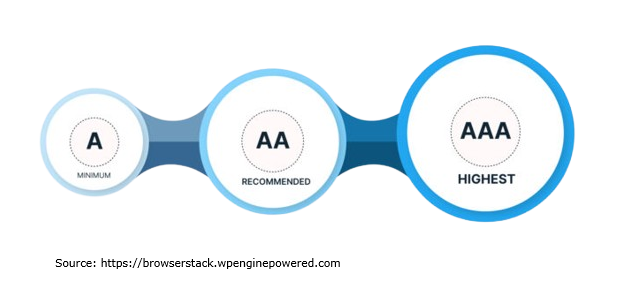
The WCAG 2.2 guidelines are categorized under 4 key principles (perceivable, operable, understandable and robust) with success criteria defined under them based on three levels of conformance: A (lowest), AA (mid-range), and AAA (highest). Higher levels automatically include the requirements of lower levels.
Level A: Minimum or Essential Accessibility
WCAG Level A represents the minimum accessibility standard required for all websites. Failing to comply with it typically indicates significant accessibility barriers that can prevent people with disabilities (and not only) from using it.
With approximately 30 success criteria, this level is designed to be achievable for any organization and establishes the essential foundation for an accessible web experience.
Level AA: Recommended or Desired Accessibility
Websites that conform to WCAG Level AA are reasonably accessible for most users, which is why this level is recommended as the standard goal for organizations. To accomplish this objective, content must achieve all Level AA and Level A success criteria.
This level adds around 20 new additional criteria on top of the basics. It is designed to enhance the accessibility of your website for most users, necessitating increased efforts from organizations to achieve compliance at this level of conformance.
Level AAA: Excellent Accessibility
Web content that meets WCAG Level AAA accessibility guidelines is considered ideal. To achieve this level, content must satisfy every WCAG requirement, including those from Levels A and AA. This level adds around 28 new success criteria on top of levels A and AA. Achieving AAA conformance makes it extremely easy for users to access websites and, in turn, benefits organizations in many ways.
More details about the above conformance levels can be found here.
Inclusive Design
While WCAG provides standards for making products accessible to everyone, inclusive design is the methodology that ensures products and/or services are accessible for users with diverse abilities. In short: WCAG tells what must be done, while this approach explains why it’s important and how to design it.
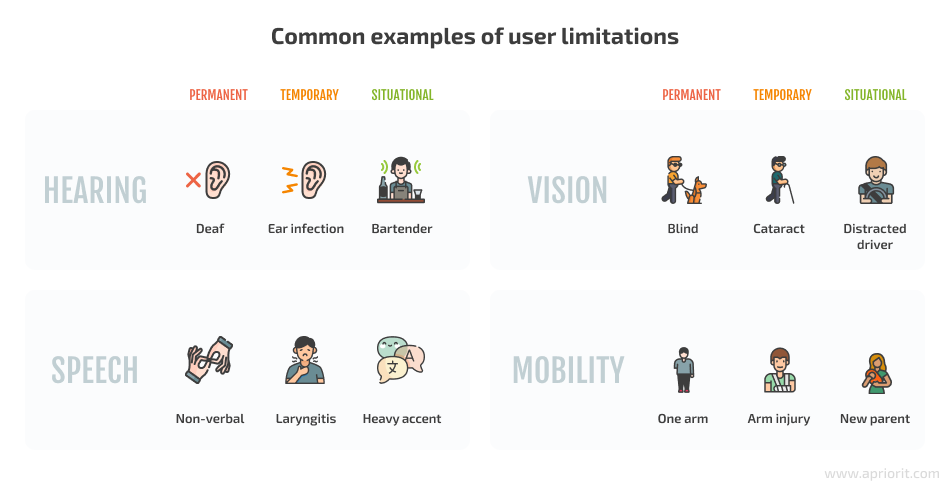
It aims to ensure software accessibility and usability based on various characteristics including a user’s age, culture, geographic location, socioeconomic background, education level, and temporary or situational limitations, race, spoken languages, and so on. The goal is to create digital experiences that are usable, flexible, and welcoming for the widest possible audience.
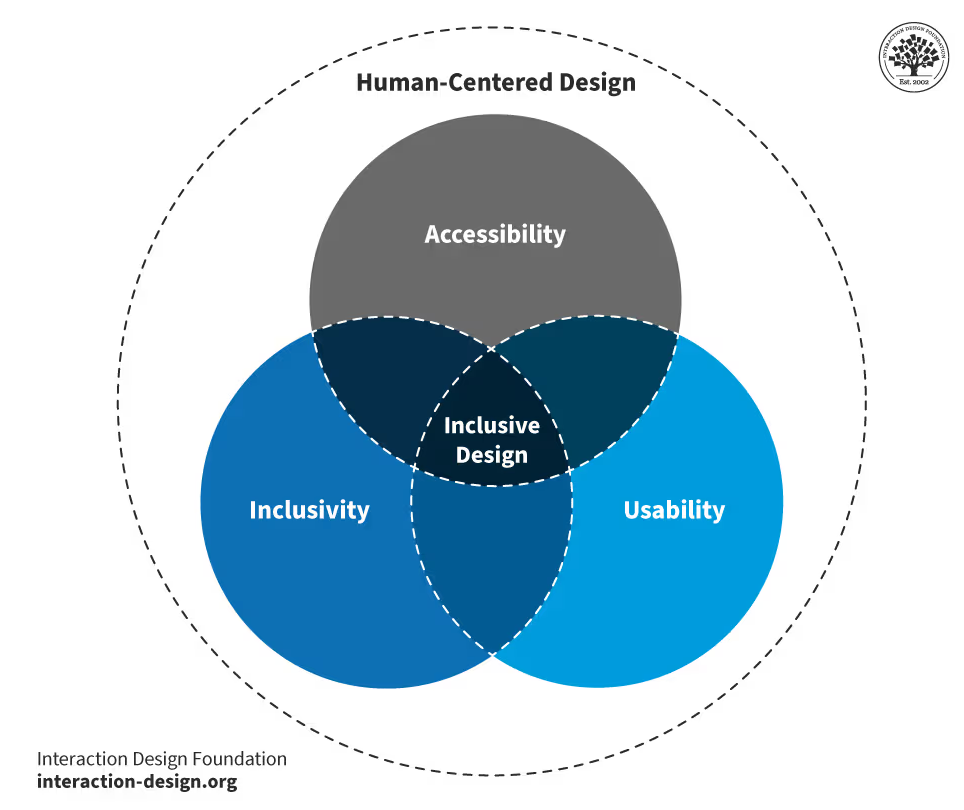
The core pillars of inclusive design are:
- Recognize exclusion – This isn’t just about disability – it can also appear in many forms such as when someone uses an older PC. By identifying these barriers early in the process (through user research and testing), you can design products that are accessible to everyone.
- Learn from diversity – This works best when everyone is involved in the process. Including people with diverse abilities, backgrounds, and perspectives helps teams identify real needs and create products that work better for everyone.
- Solve for one, extend to many – When a feature is designed to support just one group of people — such as people with low vision, limited mobility, or speech impairments — it often ends up improving the experience for all users.
Real-World Examples
Here are a few examples that illustrate the difference between non-inclusive and inclusive options:
Hearing loss:
- Non-inclusive options: Streaming movies, communicating through calls, audio alerts without visual alternatives.
- Inclusive options: Displaying subtitles or captions, transcripts, enabling chat for communication, visual indicators and notifications.
Vision impairment
- Non-inclusive options: Notification through pop-up messages, text-only content, small fonts, low contrast texts or images.
- Inclusive options: Notifications through sound and vibration, voice assistant, scalable text, high-contrast modes and adjustable color themes.
Speech impediment
- Non-inclusive options: Voice-only recognition, time-limited spoken responses
- Inclusive options: Non-voice authorization (such as PIN, biometrics), adjustable response times
Compliance roadmap
Businesses that offer digital products or services* can follow the next recommendations to move toward better accessibility:
1. Initial assessment: While a full professional audit is recommended, organizations can begin by identifying obvious accessibility issues using quick evaluation tools such as WAVE (web accessibility evaluation tool), Lighthouse browser extension or Accessibility Insights which highlight errors and provide an accessibility score.
These tools usually catch 20–40% of accessibility issues, but they are effective at identifying common problems such as:
- Missing “alt” text, poor heading structure, or low color contrast
- Keyboard navigation failures or other navigation issues
- Generates an initial accessibility score and highlights most critical issues
2. Determine applicable compliance standards: Once the initial assessment is complete, and depending on where the business operates (EU/US customers or globally), it needs to identify which accessibility laws and standards apply. With the required standards clarified, the next stage of the process can begin.
3. Compliance roadmap: After an initial assessment, the next step is to perform a comprehensive accessibility audit. Usually, this audit evaluates the product against the full set of WCAG 2.2 AA success criteria and highlights all areas which are not met. The outcome of this process is a roadmap that outlines:
- What needs to be fixed
- Who is responsible for each change
- The estimated scope and effort
- Other recommendations (such as documentation updates)
4. Documentation and maintenance: sometimes the implementation strategy might require changes that take a lot of time. In this case, it is best to prepare and publish an accessibility statement, which should include:
- The current compliance level
- A list of known accessibility issues, together with a timeline
- Date of the last review and contact information to demonstrate ongoing commitment
Aside from this, accessibility should be also part of the development pipeline. This can be done by:
- Integrating automated checks into CI/CD pipelines
- Running accessibility tests before every release
- Scheduling yearly audits
- Re-checking key user journeys regularly
5. Use accessible frameworks and libraries – Choosing the right development framework or library can significantly reduce the development time required to achieve accessibility standards. Many modern tools already include accessible components, but here are some frameworks and libraries known for their strong accessibility support:
- Frontend Frameworks: Angular, Vue.js, Svelte
- CSS Frameworks: Bootstrap 5, Tailwind CSS
- Component Libraries: Material UI (MUI), React Aria (Adobe), Angular Material, PrimeNg
- Design tools: Figma, Adobe XD, Sketch
Aside from this, AI-powered accessibility tools can assist with auto-captioning, alt-text generation, readability improvements, and intelligent WCAG issue detection.
6. Include Ongoing Accessibility Testing – To ensure that accessibility is maintained over time and to prevent regression, it is recommended to integrate regular testing early in the process. This includes a mix of:
- Automated testing using tools like WAVE, Lighthouse, or Accessibility Insights to quickly detect common issues.
- Manual functional testing, such as checking keyboard navigation, focus states, form behaviors, etc.
- Assistive technology testing, using screen readers (NVDA, VoiceOver), magnifiers, or voice control tools to simulate real user experiences.
- End-to-end testing with accessibility engines, using tools like Playwright.
- User testing with people with disabilities – if possible, include real users in testing sessions.
*Key exception: Micro-enterprises with fewer than 10 employees and annual revenue under €2 million are exempt from EAA.
Conclusion
The journey toward accessibility starts with awareness and is sustained through continuous work – from initial assessments and audits, to building roadmaps, selecting accessible frameworks, improving team workflows, and testing regularly with real users. It is an ongoing commitment, not a one-time activity.
WCAG standards specify what accessibility should look like, while inclusive design principles help teams understand why it matters and how to design with people in mind. When used together, they help businesses build products and services that don’t just follow the rules — they are inclusive and work well for all users.
Ultimately, investing in accessibility leads to products that are clearer, faster, more intuitive, and more enjoyable for all users — not just those with disabilities – but for everyone.
Îndemnul nostru
Efortul pus în programele pentru studenți completează teoria din facultate cu practica care “ne omoară”. Profitați de ocazie, participând la cât mai multe evenimente!
În cei 3 ani am lucrat la proiecte diverse ce au contribuit decisiv la evoluția mea profesională. Am colaborat strâns cu echipe remarcabile, a căror dedicare și sprijin au fost fundamentale în buna dezvoltare a lucrurilor. Cu fiecare proiect, am învățat nu doar aspecte tehnice, ci și abilități esențiale de comunicare și colaborare, reflectate în experiența mea privind interacțiunile cu clienți și modul în care o echipă eficientă operează. Aceasta este cultura companiei, de la ritmul uneori alert al zilei de lucru și practicile Agile, până la momentele relaxante de socializare cu colegii în pauzele de cafea și activități recreative precum darts și ping pong.

Am făcut cunoștință cu echipa NetRom prin intermediul programelor Internship și NetRom Software Academy, in care am descoperit că noțiunile învățate acasă au totuși aplicabilitate, chiar în cadrul unor aplicații reale. Acele experentie m-au convins să aplic pentru un job.
Mentorii foarte deschiși și colegii cu experiență care mi-au răspuns prompt la toate neclaritățile au transformat provocările în task-uri rezolvate cu succes împreună. Făcând parte din #teamnetrom mi-am depășit frica de a greși și am evoluat într-un mod echilibrat pentru mine.

Am aflat de programele NetRom de la o prezentare organizată în facultate de companie. Am decis să mă înscriu la Summer Camp din dorința de a înțelege ce anume ar presupune o cariera în IT. În urma acestui stagiu de practică, am reușit să dezvolt propria aplicație cu ajutorul mentorilor care mi-au oferit informații teoretice, dar mai ales practice, pe care nu aș fi putut sa le găsesc într-un tutorial aleatoriu de pe internet. Modul meu de abordare a aplicaților s-a schimbat odată ce am înțeles în ce constă mai exact procesul, ce presupune un mediu real de lucru și importanța muncii în echipă.

NetRom Software Testing Academy a fost punctul de plecare pentru o carieră pentru mine. Pe parcursul sesiunilor am avut oportunitatea să cunosc bazele necesare pentru asigurarea calității unui produs, urmate de o zi în companie unde am văzut teoria pusă în practică.
Recomand tuturor celor care își doresc o carieră în QA să ia în considerare această academie, fiind destinată atât celor din domeniu, dar nu numai.

Am descoperit NetRom prin intermediul unui program de internship și am fost impresionată încă de la început de mediul de lucru plăcut, de susținerea și angajamentul colegilor. A fost o oportunitate deosebită de a lucra într-o echipă de proiect, cu roluri specifice, și de a înțelege mai bine cultura companiei. Întreaga perioadă s-a dovedit o experiență valoroasă, atât din punct de vedere al cunoștințelor acumulate, cât și prin prisma relațiilor dezvoltate. În momentul în care mi s-a propus să continui ca angajat permanent, a fost o decizie ușor de luat, bucuroasă fiind să pot aplica cele învățate, dar și să adaug cunoștințe noi în fiecare zi.
