

March 27, 2026 ⏱️ 10 min
By Gabriel O. (RnD – DevOps Group)
As Kubernetes evolves, so does external traffic management. NGINX Ingress Controller, the standard for many setups, will reach end-of-life in March 2026 and stop receiving updates or fixes.
This means that all clusters must start implementing new strategies for managing external traffic.
This article identifies the key impacts of the deprecation as well as the main challenges and possible solutions. It will conclude by establishing why Envoy Gateway is a great candidate for continuing forward.
Ingress Controllers & NGINX Changes
An Ingress Controller monitors ingress resources and applies their routing rules, serving as the edge traffic manager in the Kubernetes cluster. Responsibilities may include:
- TLS termination. The Ingress terminates TLS connections.
- Routing. Based upon the hostname and path of the request, the Ingress directs the request to a specific backend
- L7 load balancing. The Ingress distributes incoming L7 requests across available pods/services
- Headers. The Ingress can manipulate headers and filter traffic.
- Service Exposure. The Ingress exposes a service to the outside world
Let’s formalize this with a table of capabilities:
| Capability | Description |
|---|---|
| TLS Termination | Terminates HTTPS at the edge so that the backend services do not have to encrypt/decrypt the request and enforces secure communication between the client and server. |
| Host- and Path-Based Routing | Directs incoming traffic to the correct backend based upon the requested hostname and URL path |
| Layer 7 Load Balancing | Distributes incoming L7 requests across available pods/services. |
| Annotation-Driven Configuration | Allows fine-grained, per-ingress configuration of behavior and policies via annotations. |
| Cloud Load Balancer Integration | Integrates with managed cloud load balancers in Kubernetes clusters. |
Ingress NGINX Deprecation
On November 10, 2025, the Kubernetes SIG Network and Security Response Committee announced that the Ingress NGINX Controller would be retired in March 2026. After that date:
- No new releases
- No bug fixes
- No security or CVE patches
- GitHub repos become read-only
While current deployments will remain operational, continued use of an unmaintained edge component, especially one managing internet traffic, poses growing operational and security risks.
Only the community ingress-nginx project is affected by this retirement; some vendor-supported NGINX-based ingress controllers are still in use.
What Problem Are We Solving
Structural issues will arise with the planned removal of Ingress NGINX, a critical part of managing traffic in Kubernetes environments:
-
- Security risk: For example, after March 2026, a known vulnerability in Ingress NGINX could be exploited to gain unauthorized access to sensitive data in a production cluster.
- Compatibility risk: When a new networking API is introduced in Kubernetes in 2027, teams that depend on the unsupported Ingress NGINX may face outages as their ingress rules stop working.
- Operational debt: Teams might have to spend extra hours troubleshooting legacy ingress rules that don’t work with updated Kubernetes clusters, causing slower deployments and longer incident response times.
- Architectural stagnation: The limitations of the Ingress API restrict the adoption of modern traffic management capabilities, such as multi-protocol support, advanced routing, and multi-tenant policies.
Our goal is to provide a framework to help teams choose the right ingress or gateway strategy before the deadline.
From Ingress to Gateway API
The Kubernetes community has largely shifted innovation and development toward the Gateway API, a more expressive, extensible, and role-oriented successor to Ingress. Gateway API introduces:
- GatewayClass, Gateway, HTTPRoute and other CustomResourceDefinitions
- Multi-protocol routing (HTTP, TCP, UDP, gRPC)
- Delegation and multi-tenant support
- Stronger abstraction of data plane vs control plane
Overview of Candidate Solutions
Below is a landscape view of alternatives you might consider before planning migrating away from Ingress NGINX:
Self-Managed / On-Prem Options
| Option | Description | Pros | Cons |
|---|---|---|---|
| Envoy Gateway | Gateway API-first envoy-based gateway | Modern API, extensible, service-mesh friendly | Learning curve |
| HAProxy Ingress / Gateway | Ingress & future Gateway support | High performance, mature | Config complexity |
| Traefik | Kubernetes-native controller | Simplicity, active maintenance | Less advanced policy engine |
| Istio Ingress Gateway | Part of service mesh | Rich L7 features, mTLS | Large footprint |
Cloud-Native Managed Options
| Option | Description | Pros | Cons |
|---|---|---|---|
| Azure App Gateway + Gateway API | Managed cloud LB integrated with GW API | Managed ops, security | Platform lock-in |
| AWS ALB + Gateway API | AWS native LB with Gateway API | Cloud-native, scale | Less flexible than custom |
| Google Cloud Gateway | GCP ingress with API flexibility | Managed infrastructure | Platform lock-in |
Choosing the Right Solution
There are strong alternatives to NGINX Ingress, including cloud-managed gateways and service mesh ingress. Each of these alternatives is meant for a particular situation and has its own benefits and drawbacks worth looking into:
- Cloud-managed gateways reduce operational effort
- Ingress solutions utilizing service mesh improves security
- Kubernetes-native flexibility increased by Gateway API-native controllers
Every option has its unique trade-offs and context. Each of the alternatives matches the need of various organizations and comes with a specific benefit i.e. lower effort of operations or higher security:
- Cloud-managed gateways reduce operational effort but limit Kubernetes-native flexibility, potentially leading to platform lock-in. This lock-in can restrict future scalability and integration with other systems
- Service mesh ingress solutions like Istio offer solid security and observability, along with complete traffic management and policy enforcement. Nonetheless, due to the complex nature of control planes with multiple components, operational complexity would be high.
Envoy Gateway represents the most balanced choice for most Kubernetes platforms because:
| Capability | Benefit |
|---|---|
| Gateway API–first design | Aligns with Kubernetes’ long-term networking direction |
| Envoy data plane | Proven, high-performance proxy used at large scale |
| Advanced L7 routing & observability | Rich traffic control and visibility without requiring a full-service mesh |
| Platform portability | Works consistently across on-prem and cloud environments |
| Clear responsibility separation | Enables governance between platform teams and application teams |
For these reasons, the rest of this article concentrates on Envoy Gateway as a reliable replacement for NGINX Ingress.
Envoy Gateway Deep Dive
Why Envoy Gateway is a strong replacement candidate
Envoy Gateway sets itself apart because it prioritizes Gateway API as opposed to relying on annotations. That transition helps with portability; you end up with a common way to communicate routing and gateway behavior with clean mobility between clusters and environments. It also adds consistency because you aren’t stitching together behavior by throwing up an annotation once and for all, environment-specific and likely to drift over time.
With a focus on Kubernetes Gateway API CustomResourceDefinitions, such as GatewayClass, Gateway, and HTTPRoute, Envoy Gateway creates configuration solutions that are easier to move, keep on track, and operate day to day. In contrast, NGINX Ingress is typically limited to its custom annotations as to the behavior, which can be less consistent and make it more difficult to move from one environment to another.
Under the hood, Envoy Gateway is powered by Envoy Proxy. That matters because Envoy is a well-known data plane with strong observability, capable Layer 7 routing, and fast performance. It’s also a popular choice in service meshes and at cloud scale, including deployments related to the Google Cloud Platform and Amazon Web Services.
It also enforces a clearer separation of responsibilities between:
- Platform teams (managing Gateways, TLS, and cluster-level policies)
- Application teams (defining HTTPRoutes in their namespaces)
This reduces configuration sprawl and improves governance at the edge of the cluster.
Target architecture with Envoy Gateway
A typical production setup follows this flow:
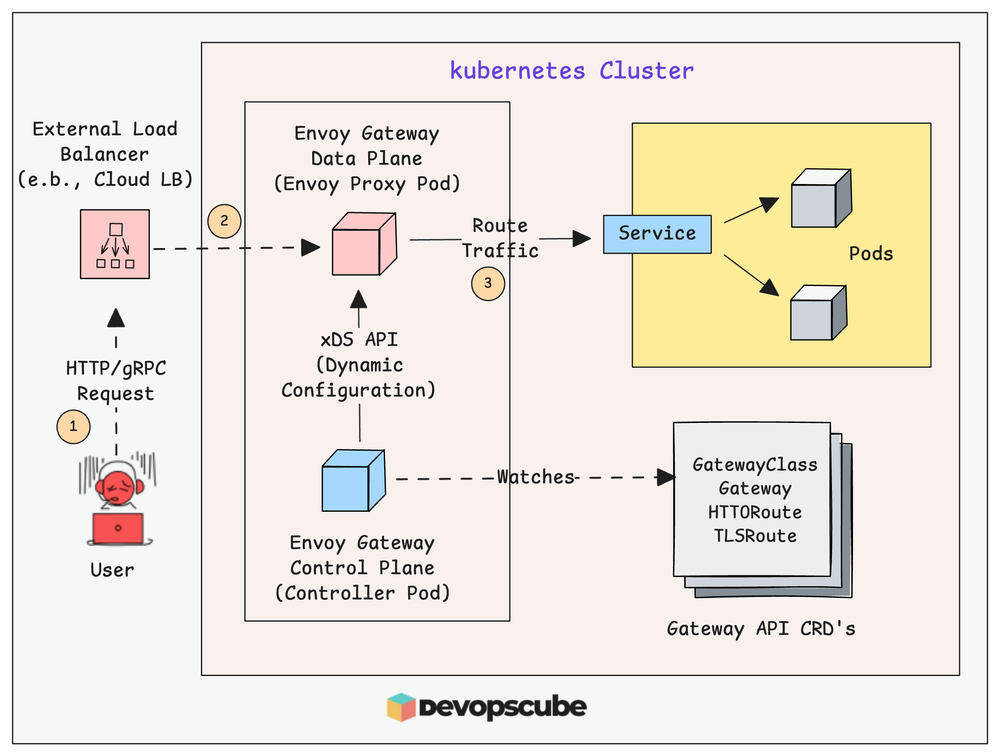
Key design decisions include:
- Using a single shared Gateway vs. multiple Gateways per domain or team
- Exposing Envoy Gateway via a public or internal LoadBalancer
- Deciding whether TLS terminates at Envoy Gateway or at a cloud edge service
Implementation prerequisites
Before installing Envoy Gateway, you should align on:
1. Kubernetes version & Gateway API support
- You will install Gateway API CustomResourceDefinitions (Envoy Gateway depends on them).
- Ensure your cluster admission policies / OPA policies allow these CustomResourceDefinitions.
2. DNS & Load Balancer strategy
- Decide the public hostname(s) and where DNS should point: directly to the Envoy Gateway Service’s external IP, or to a cloud edge component (Front Door / App Gateway), then to Envoy.
3. TLS strategy
- If you already use cert-manager, keep it: it works well with Gateway API.
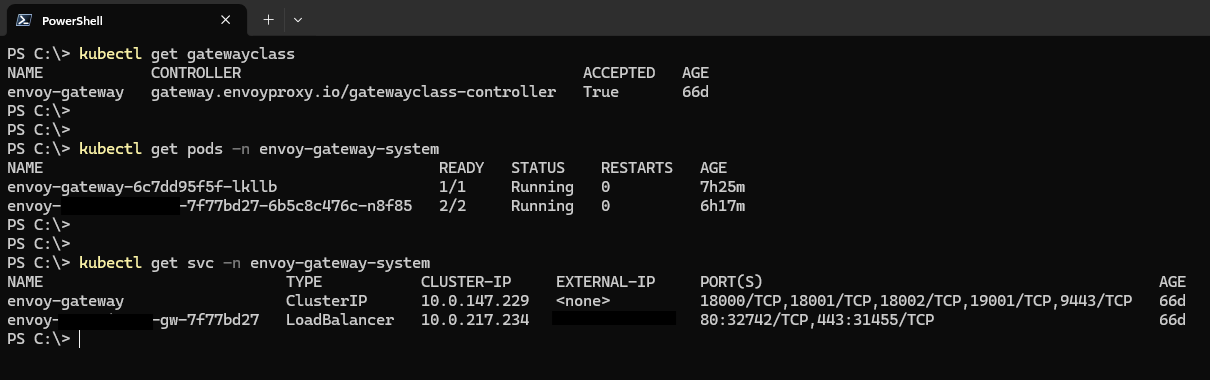
Expected baseline after deployment
Once Envoy Gateway and the Gateway API are in place, your cluster should resemble the following state.
Enables Gateway API functionality
| Component | Expected State | Purpose |
|---|---|---|
| Namespace | envoy-gateway-system | Hosts gateway controller and data plane |
| Gateway API CRDs | gatewayclasses.gateway.networking.k8s.io gateways.gateway.networking.k8s.io httproutes.gateway.networking.k8s.io |
Enables Gateway API functionality |
| Controller | envoy-gateway-controller running | Control plane managing gateway configuration |
| Data plane | Envoy proxy pods running | Processes and routes traffic |
| Gateway Service | Type: LoadBalancer (public or internal) | Entry point for external traffic |
| External IP | Assigned | DNS target or upstream gateway destination |
A healthy baseline can be confirmed with:
Create your first GatewayClass and Gateway
Envoy Gateway typically provides a GatewayClass that represents the implementation.
Example Gateway (HTTP + HTTPS listeners):
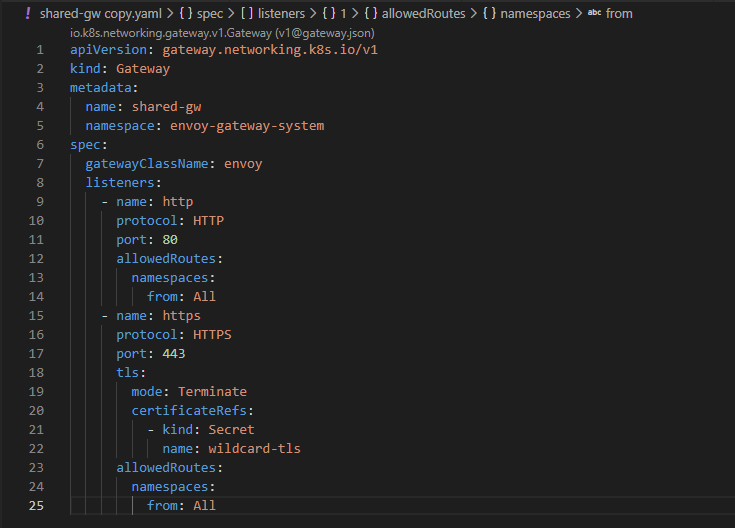
Notes:
- allowedRoutes (lines 12-14 and 23-25) is a powerful control point. Many platform teams restrict it (e.g., only allow routes from specific namespaces).
- certificateRefs (lines 20-22) points to a Secret with tls.crt and tls.key (often managed by cert-manager).
Define routing with HTTPRoute (Ingress replacement)
This is where app traffic rules move from NGINX Ingress resources to Gateway API routes.
Example:
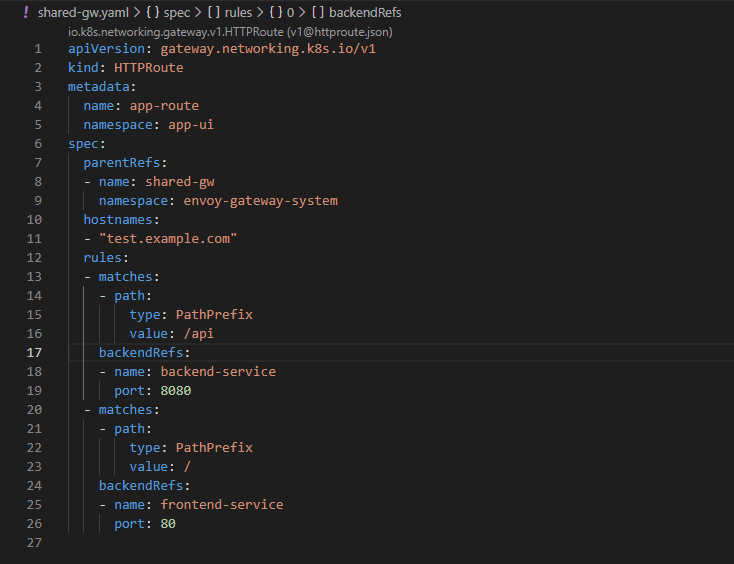
How matching rules are defined
The routing decisions are made in the rules.matches section (lines 11-12), which comprises:
- hostnames (lines 10-11), which matches the Host header of the incoming request
- matches[].path (lines 12-23), which specifies how to match the path of the request
- backendRefs (lines 24-26), which specifies where to forward the request
In the code snippet above:
- hostnames: app.example.com specifies that we are only interested in requests to that domain
- value: /api matches any request that starts with /api
- value: / matches any request that starts with /
Handling common NGINX annotation equivalents
The most common NGINX migration pain is “What happens to my NGINX annotations?”
Instead of trying to replicate 1:1 immediately, group them by functions:
| NGINX Annotation / Function | Gateway API / Envoy Approach | Migration Guidance |
|---|---|---|
| Path routing & rewrites (rewrite-target) | HTTPRoute.rules.matches + URLRewrite filters | Migrate early; validate application paths |
| Host routing | HTTPRoute.hostnames | Direct replacement |
| Force SSL redirect (ssl-redirect, force-ssl-redirect) | Gateway HTTPS listener + redirect policy | Prefer Gateway-level enforcement |
| Timeouts (proxy-read-timeout, proxy-send-timeout) | Envoy timeout policies | Start with defaults; tune after migration |
| Retries (proxy-next-upstream) | Envoy retry policies | Add after baseline validation |
| Header manipulation (add-header, proxy-set-header) | Request/response header modifiers | Apply after routing validation |
| Header manipulation (add-header, proxy-set-header) | Request/response header modifiers | Apply after routing validation |
| CORS configuration | Route-level CORS policies | Validate browser behavior |
| Rate limiting | Envoy rate limit filter or external service | Implement as a later enhancement |
| IP allow/deny (whitelist-source-range) | Gateway policies / external WAF | Prefer centralized security controls |
Observability from day one
It is necessary that Envoy Gateway has observability or monitoring capabilities during NGINX Ingress migration.
At the very least, you should have:
Metrics using Prometheus
- Envoy provides many crucial metrics like request rate, 2xx/4xx/5xx response codes, latency, and upstream health.
- These help detect traffic spikes, failure and performance issue very early.
Dashboards with Grafana
- Make dashboards for the request rate, error rate, and latency (P95/P99).
- Metrics should be further categorized by route, hostname, or namespace, especially in multi-tenant settings.
Get access logs
- By providing access to the following request level logs for requests at and before the proxy layer, you can help debug routes and validate your traffic flow. The logs give you the request path, status code, upstream service to which the request is routed, and latency.
During migration, it is crucial to ensure:
- requests are routed correctly to the backend
- there are no unexpected errors (e.g., 404/503)
- latency is within expected limits
Envoy Gateway has excellent out-of-the-box observability features, and integrating it from day one is critical for a safe and controlled migration.
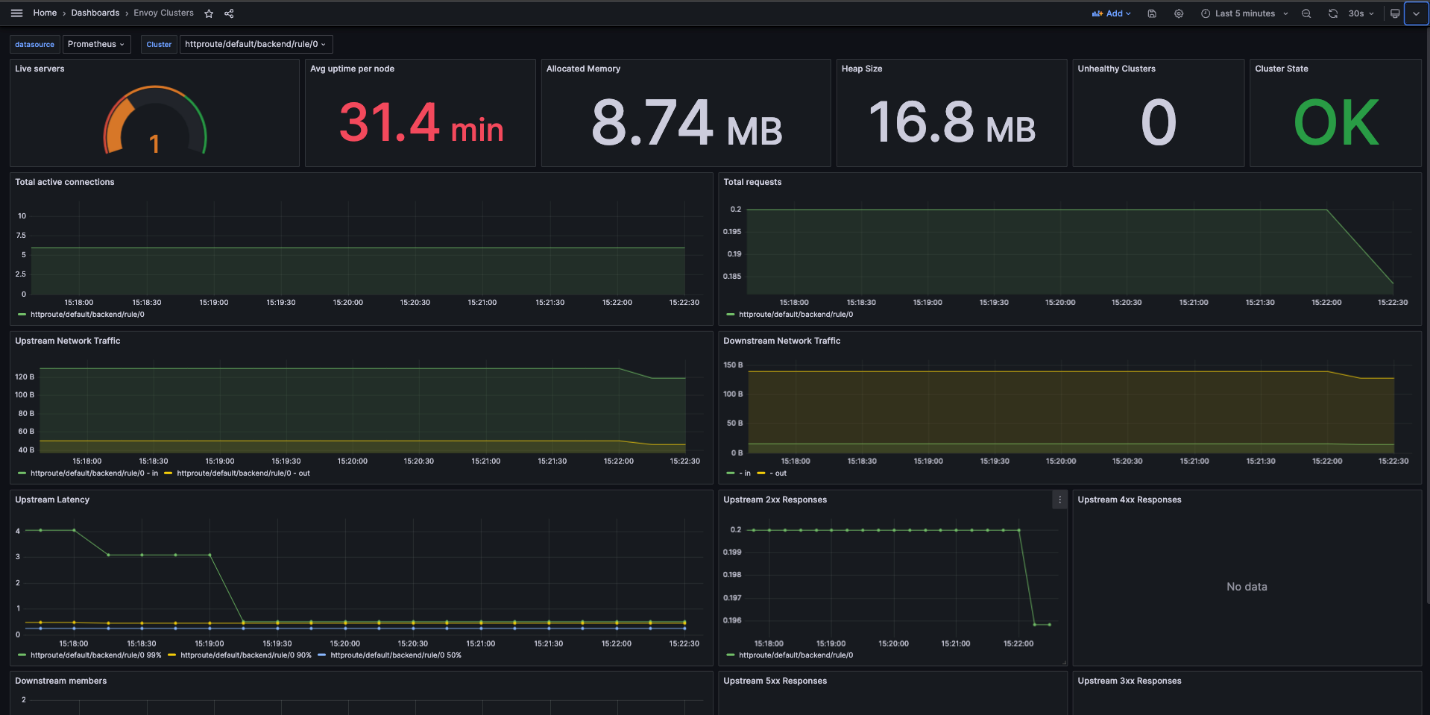
This dashboard example shows the overall stats for each cluster.
Security posture
Envoy Gateway helps in securing the edge by making it explicit and standardized.
Several key areas are included:
- TLS Termination: This is defined directly in the Gateway using listeners and certificateRefs, ensuring consistent and centralized HTTPS termination.
- Traffic Control and Isolation: Using allowedRoutes and namespace boundaries, security is improved by controlling what applications are allowed to attach routes to a Gateway.
- Policy-Based Security: Using the Gateway API, security policies can be integrated with:
- WAF applications (cloud WAF or Envoy filters)
- Rate limiting
- IP allow/deny
Security is improved through the following examples:
- Limit traffic in specific namespaces so other applications cannot attach routes.
- It allows an application to skip handling HTTPS termination since that happens on the gateway.
- Incorporate a rate limiter or WAF which helps in preventing abuse and common attacks.
In Envoy Gateway, security is not entirely dependent on annotations being more structured and reusable unlike NGINX Ingress.
Conclusion
With NGINX Ingress retiring in March 2026, teams must move to a supported alternative.
The Kubernetes ecosystem is clearly aligning around the Gateway API.
Envoy Gateway offers a modern, portable, and secure replacement built on a proven data plane.
A gradual, parallel migration minimizes risk while modernizing your edge architecture.
Îndemnul nostru
Efortul pus în programele pentru studenți completează teoria din facultate cu practica care “ne omoară”. Profitați de ocazie, participând la cât mai multe evenimente!
În cei 3 ani am lucrat la proiecte diverse ce au contribuit decisiv la evoluția mea profesională. Am colaborat strâns cu echipe remarcabile, a căror dedicare și sprijin au fost fundamentale în buna dezvoltare a lucrurilor. Cu fiecare proiect, am învățat nu doar aspecte tehnice, ci și abilități esențiale de comunicare și colaborare, reflectate în experiența mea privind interacțiunile cu clienți și modul în care o echipă eficientă operează. Aceasta este cultura companiei, de la ritmul uneori alert al zilei de lucru și practicile Agile, până la momentele relaxante de socializare cu colegii în pauzele de cafea și activități recreative precum darts și ping pong.

Am făcut cunoștință cu echipa NetRom prin intermediul programelor Internship și NetRom Software Academy, in care am descoperit că noțiunile învățate acasă au totuși aplicabilitate, chiar în cadrul unor aplicații reale. Acele experentie m-au convins să aplic pentru un job.
Mentorii foarte deschiși și colegii cu experiență care mi-au răspuns prompt la toate neclaritățile au transformat provocările în task-uri rezolvate cu succes împreună. Făcând parte din #teamnetrom mi-am depășit frica de a greși și am evoluat într-un mod echilibrat pentru mine.

Am aflat de programele NetRom de la o prezentare organizată în facultate de companie. Am decis să mă înscriu la Summer Camp din dorința de a înțelege ce anume ar presupune o cariera în IT. În urma acestui stagiu de practică, am reușit să dezvolt propria aplicație cu ajutorul mentorilor care mi-au oferit informații teoretice, dar mai ales practice, pe care nu aș fi putut sa le găsesc într-un tutorial aleatoriu de pe internet. Modul meu de abordare a aplicaților s-a schimbat odată ce am înțeles în ce constă mai exact procesul, ce presupune un mediu real de lucru și importanța muncii în echipă.

NetRom Software Testing Academy a fost punctul de plecare pentru o carieră pentru mine. Pe parcursul sesiunilor am avut oportunitatea să cunosc bazele necesare pentru asigurarea calității unui produs, urmate de o zi în companie unde am văzut teoria pusă în practică.
Recomand tuturor celor care își doresc o carieră în QA să ia în considerare această academie, fiind destinată atât celor din domeniu, dar nu numai.

Am descoperit NetRom prin intermediul unui program de internship și am fost impresionată încă de la început de mediul de lucru plăcut, de susținerea și angajamentul colegilor. A fost o oportunitate deosebită de a lucra într-o echipă de proiect, cu roluri specifice, și de a înțelege mai bine cultura companiei. Întreaga perioadă s-a dovedit o experiență valoroasă, atât din punct de vedere al cunoștințelor acumulate, cât și prin prisma relațiilor dezvoltate. În momentul în care mi s-a propus să continui ca angajat permanent, a fost o decizie ușor de luat, bucuroasă fiind să pot aplica cele învățate, dar și să adaug cunoștințe noi în fiecare zi.
